Own server or cloud server, what is the best option for your organisation? You will discover that in our whitepaper, with extensive business case and advice for your company, so that you can choose the best solution.
Large enterpriseSME15/06/2020
We wrote this blog article based on our many years of experience in installing and managing IT infrastructure. We have managed servers in storage rooms, in technical rooms, in data centres and for some years now also with public cloud providers. In the meantime we dare to say that we are experts in the matter.
What does on premise mean?
‘On premise’ means that servers are physically located at the organisation. So it is about own servers.
We come across on premise servers everywhere, under the reception desk, in the cleaning closet, in the archive. Or in separate server rooms with air conditioning, emergency power generator and complete fire protection with gas extinguishing.
What is cloud?
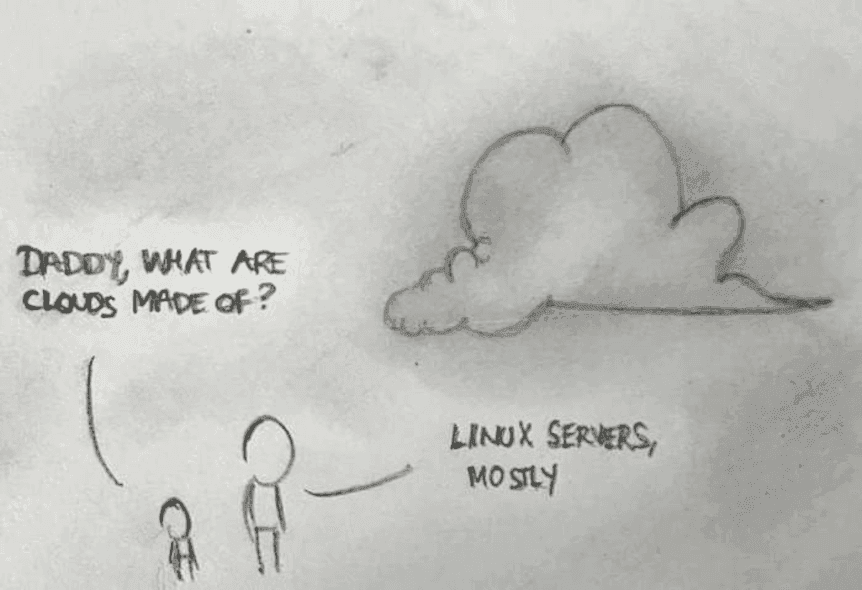
For one person cloud is equal to fancy ready made services at Amazon or Azure, for another cloud is something that really sits in the ‘clouds’. Another, more down to earth observation is that the clouds consist of Linux servers:
But what then is public cloud?
There is a special subcategory of cloud and we call that public cloud. Some cloud providers have in fact become so big that they have started to lead a life of their own. The public cloud market is dominated by Microsoft Azure and Amazon Web Services (AWS).
These providers have a wide range and can deliver capacity quickly. In the data centres of Level27 and certainly on premise a bit more time is needed. Obviously this flexibility does not come for free. Budget control and management with public cloud providers is a major challenge.
The components of a finished service
Below we list the components that we (can) provide. Whether the component is needed depends on the project and the situation.
Housing: Servers can be located in a specially equipped room, in a separate room that is not intended for servers, or in a data centre.
Physical security: By this we mean controlling access to the server equipment, wherever it is located. Poor physical security can result in theft, damage, disruption or unauthorised access to data. Unfortunately you cannot always assume that physical security is in order. The consequences of a breach are however major, long downtimes and high costs Level27 holds an ISO 27001 certificaat, a certificate by which you can recognise a reliable hosting or data centre organisation in the field of information security.
Fire protection: Of course we also want to protect the servers at all times against fire. On premise you can provide automatic fire extinguishers for this, but in most cases the equipment is lost in such an extinguishing. In a data centre on the other hand, you can install a system that prevents damage to the equipment.
Temperature control: A temperature that is too high also has a negative impact on servers, such as for example acute damage to the equipment. For temperature control too, data centres offer a better solution than on premise.
Guarantee of power supply: Power outages we want to avoid at all costs of course. Not only do you have downtime during and after a power outage, you also lose time because you have to restart the infrastructure. In addition, magnetic disks are very sensitive to power outages, causing your equipment to be damaged.
Lifecycle management: The lifespan of hardware is variable, but in general you can state that servers, hard disks and fans last 3 years. For network equipment the lifespan is 5 years.
Monitoring: Monitoring the whole is a next component of a successful service. With monitoring we check remotely whether your infrastructure is available and performing. Often however only a part is monitored. A full monitoring on the other hand monitors all aspects of the infrastructure.
Management: Monitoring of course is not enough, there must also be a response. It is therefore important that your infrastructure is managed both reactively and proactively.
Protection against data loss (backups): Whatever degree of data centre or redundancy you have, there is always an additional protection needed against data loss. Backups are a copy of all data at a completely independent location.
Location of the data/ISO 27001/GDPR: A sensitive point today is the location of your data, its security and the impact this has on GDPR legislation. An interesting and helpful fact is the certification of ISO 27001. Just like data centres, service providers such as Level27 can be ISO certified (and as we said above, we are indeed)!
Network: The scalability of the infrastructure and network connections depends very much on the location. On premise coax connections, VDSL connections and fibre connections are among the possibilities. In data centres you have access to dozens of Tier 1 network providers with dozens of Gbits per provider.
Scalability: Whether scalability is important depends on the project. A public website for example has a similar load pattern. A festival website on the other hand has strong peaks at certain moments. Public cloud is strongly in advantage here.
In our whitepaper we go deeper into the differences between on premise and cloud servers per component, so that you get a clear view of the advantages and disadvantages.
Own servers vs cloud servers
Price
If you only look at the price, you can observe the following:
With heavier servers on premise seems the most interesting option to choose.
With lighter servers the TCO in cloud is considerably more advantageous than on premise, given the initial investments that are still required for an on premise situation.
Risks
A low price has an influence on quality and risks. So you may state that the more risks you want to mitigate and performance you want to gain, the higher the price is.
Your project
The real question you need to ask yourself is what has priority for your organisation or project:
As low a price as possible;
As low a risk as possible;
As high performing a setup as possible;
…
That is why we find it important that you are aware of all factors before making a definitive choice.
Private cloud or public cloud?
Besides on premise there remain two options open: private cloud and public cloud. We are of the opinion that neither option can be preferred in advance.
The choice must be made based on your project. What does the application look like? Where are the users located? What are the budgets?
Conclusion
As you have been able to read, (good!) data centres are armed against quite a few risks, which means you can save a lot of downtime, time and money if you place your servers there. And what then if you have to choose between cloud and public cloud? This choice cannot be made so straightforwardly. That is why we look at this project per project.
Could you use help with your choice between cloud and public cloud? Contact us for a clear overview with the defined choices in services and prices.