

logo level
SME
Agency
Large enterprise
contactOperationalControl Panel
newsserver-side-tagging-available

Server Side Tagging now available

We have great news, because starting today, Server Side Tagging via Google Tag Manager is available in our control panel. What does this mean for you? Think of more control over your tracking, better website performance, and extra privacy protection for your visitors! In this blog, we explain what SST is, why it is so powerful, and how you can easily activate it via our platform.

General23/04/2025
Server Side Tagging now available image

What is Server Side Tagging and how does it work?

With Server Side Tagging, you take control of your tracking. You no longer run tools such as Google Analytics or The Meta Pixel in your visitors' browsers, but send them via a server environment that you manage yourself.

With traditional (client-side) tagging, scripts are loaded in the browser. These scripts collect data such as page views, click behavior, and purchases, and send this data directly to external platforms.

Server Side Tagging takes a different approach, where the process is as follows:

  • Data transmission to the server container: the browser sends the collected data to a server container that you manage yourself.
  • Processing on your server: here, the data is checked, filtered, and modified if necessary (for example, by removing sensitive data).
  • Forwarding to external tools: only after the data has been processed does your server forward the data to the relevant analytics or marketing platforms.

This way, you act as the intermediary and have complete control over the tracking data.
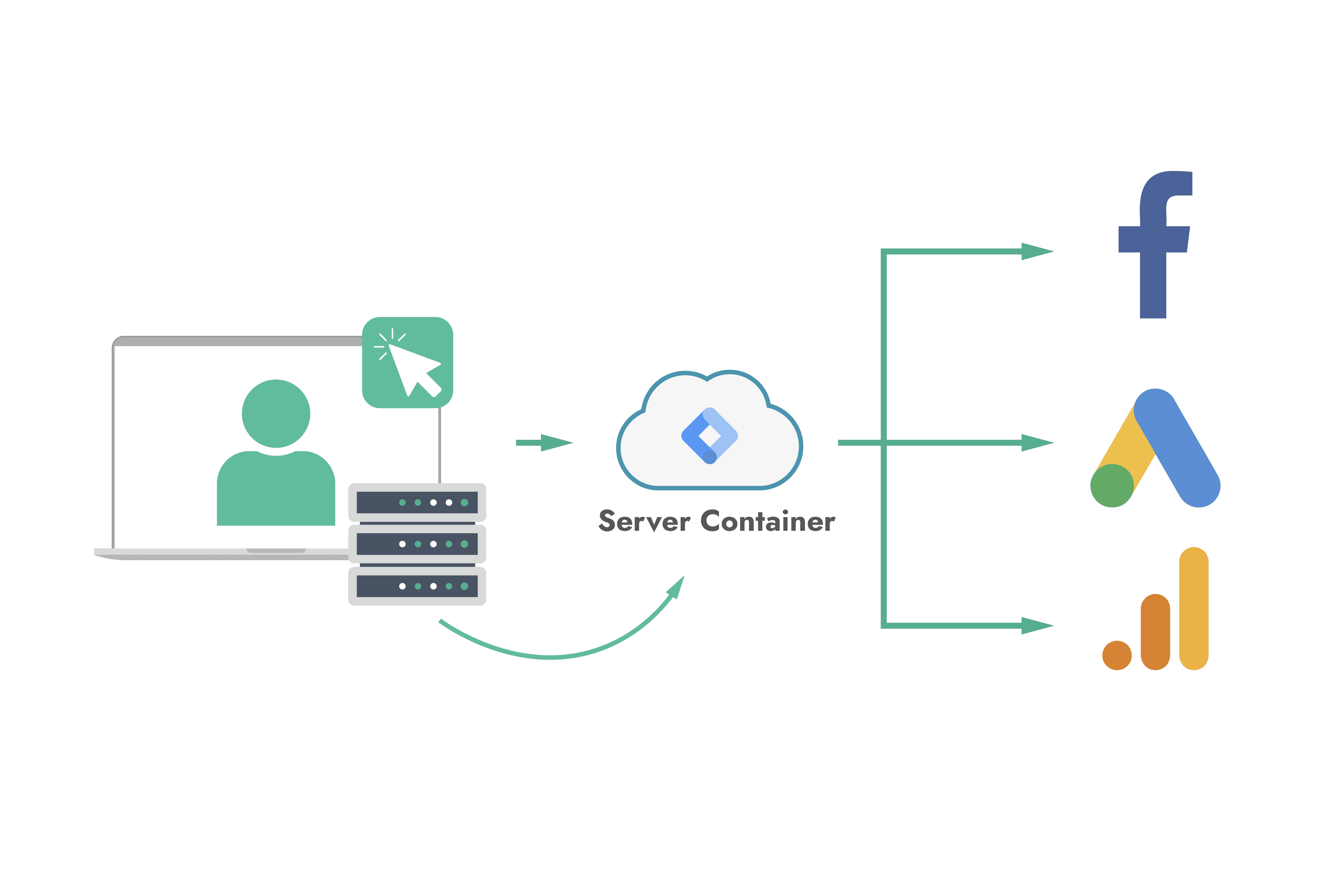
image1085

Why is this a must-have for your website?

Whether you run a webshop, manage a content platform, or have a corporate website, Server Side Tagging offers concrete advantages that traditional tracking cannot match:

More control over your data
You decide which data is or is not forwarded to external parties such as Google or Meta. This makes your data processing more transparent and secure, without compromising compliance with data protection legislation such as the GDPR.

Fatser loading times
Because fewer scripts are loaded directly in the browser, your website becomes noticeably faster. Faster websites convert better and rank higher in search engines.

Reliable tracking despite ad blockers and browser restrictions
Browser features such as ITP (Safari) and ETP (Firefox) block third-party cookies and tracking scripts by default, without users having to do anything. With Server Side Tagging, you send tracking data through your own server, largely circumventing these restrictions. This means you get much more reliable data, even from visitors with privacy-protecting browsers.

Better privacy and compliance
You can filter and anonymize sensitive or personal data before it reaches external tools. This allows you to maintain the functionality of your tracking without compromising privacy rules.

How do you activate server-side tagging in the control panel?

Activating this feature is easy and can be done in a few minutes via our control panel:

  • Log in to your control panel
  • Navigate to your project
  • Create a new component of the type Google Tag Manager
  • Set the container configuration, which you can find in your Google Tag Manager account
  • Link a URL to your component and let your users connect to it

Want to know more? Set up SST using our Academy

Open de Academy

Try it out today!

This update provides you with a more powerful and intelligent way to process your visitor data. Would you like to get started immediately? Log in to your control panel and enable Server Side Tagging within minutes. Do you have any questions or require assistance with the setup? Our support team is ready to assist you!

Stay informed

Subscribe to our newsletter and receive the latest updates on our products and services.

By subscribing, you agree to our privacy policy