Have you ever heard of hacked websites, or have you ever been a victim of a hacked site yourself? Let’s go over a few things. Why are websites hacked, and how does it happen? After that, we’ll look at how you can prevent it and what your options are if it happens to your site.
The most common reason is commercial. By exploiting your website to spread certain content, hackers increase the reach of their message.
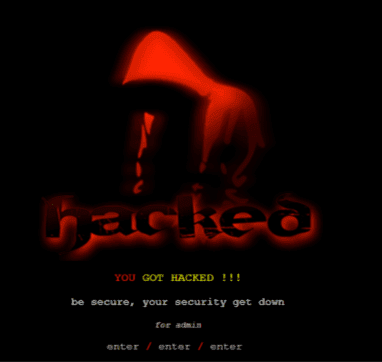
Usually, after hacking your site, they simply replace your content with their own message, for example, illegal medicines or links to porn sites. This is a very clear form of hacking, and you can immediately notice it when you visit your site:
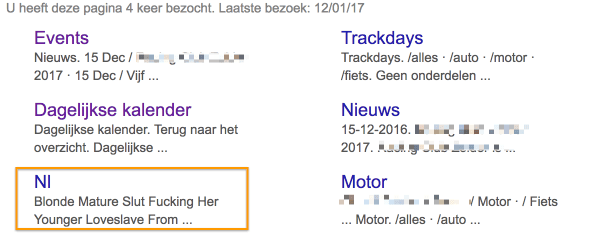
A subtler form is “Blackhat SEO.” The content of the site appears unchanged to us, so we don’t notice the hack. However, they alter the content as search engines see it. This is much harder to detect.
Finally, these kinds of hacks are also carried out to misuse our servers to send large volumes of emails. It is true that servers have a high capacity for sending emails. With a hack, sites can easily send more than 10,000 emails per minute promoting (again) illegal or counterfeit medications, or your website might be used to attack other websites using our server capacity.
Hacktivism
Just like with DDOS attacks, this is an important motive. While DDoS aims to make your site unavailable, here they try to embarrass you by altering your site’s content. This is called “defacing.” If your site suddenly looks like this, you know it has been compromised:
Usually, hackers want to make a point. They believe that your site’s security needs improvement, or they disagree with your message or way of working.
Boredom – fun
This is also a motivator. There are just too many people with too much time and too much technical knowledge. A dangerous cocktail.
Types of attacks
Attacks can be divided into two main groups:
Random attacks. As soon as your site is online, it gets indexed by search engines (at least that’s what you want) and appears on the radar of potential hackers. These hackers use so-called “crawlers” or “bots” that scan hundreds or even thousands of websites to see which software or versions they are running. Once they know that, they check for known vulnerabilities or “bugs” that can be exploited to hack the site.
Targeted attacks. These attacks usually target larger companies or organizations. These sites are generally better protected and therefore harder to hack. The hackers are usually technically skilled and take it as a challenge to find a small gap in the security.
It’s a rough comparison, but it helps visualize it. If you compare hacking to theft: random attacks are like a gang of thieves trying the doors of all cars in a large parking lot, while a targeted attack is like a bank robber planning for weeks to breach a well-secured bank and get the big prize.
Prevention
Before we get to the “Cure” chapter, here are some essential tips for preventing hacks. If you ignore these, you are asking for trouble!
Install updates. If you use a CMS like WordPress or Drupal, you must constantly update your website! New security vulnerabilities are discovered and exploited all the time. Not updating your site is like leaving your front door wide open. It’s inconvenient, but necessary. Get advice from us or your web developer; there are plenty of tools to make this process smooth.
Backups. If you do become a victim, it’s crucial to have backups of your site from before it was hacked. More about this in the “Cure” chapter at the end of this article. We make hourly backups and keep them for 30 days. But it’s also a good idea to occasionally make your own backups.
Use strong passwords.The number of sites using “admin” as a username and “1234” as a password is countless. Hackers know this. Using a password like this is not just leaving your front door open, it’s like putting up signs on the street saying “Hack me, please!”
Install security plugins. For almost every CMS, plugins are available that make your site more secure. They can block hackers after a few failed login attempts and report possible attacks.
Hosting configuration. Properly configuring your web hosting according to your CMS can also help prevent hacks. For example, known hacking methods can be blocked, specific folders secured, etc. It’s also very important that if you use shared hosting, your provider ensures that all websites run in separate containers. If one site is hacked, the others will at least remain safe.
Secure your PC. Viruses and malware on your PC can easily compromise all your files, including stored passwords and keys you use to log in to your website. Make sure your PC is not a breeding ground for viruses.
Curing
Let’s take a look at what Drupal and WordPress, two popular website systems, say themselves:
The most important thing is to stay calm and not panic. Yes, it’s very frustrating and potentially damaging for you and your brand. But not all is lost, there are steps you can take, and there are plenty of organizations that can help.
Restoring a backup
The first important question: do you have backups? If you or your hosting provider have a backup, the smartest action is to make a copy of the hacked site for later investigation and then restore a backup from before the hack. After restoring, immediately go back to the Prevention steps to avoid being hacked again.
Depending on the age of your last backup, you may lose some content or changes made to your website. You can recover these from the copy of the hacked version or redo the changes. For dynamic sites such as webshops, this is naturally more complex, as you may lose orders. Handling these sites requires extra caution. You might consider taking the website temporarily offline with a notice while you gather all the necessary data and restore the site safely.
No backup?
This is worse, much worse. Essentially, you have only two options:
Clean the website. Sometimes this is possible. Sometimes the hack is so subtle that you may never fully find it, or files may have been deleted by the hackers. There are companies that promise to clean hacked sites, and very often they succeed. But no one can guarantee that your site will be fully restored to its pre-hack state.
Discard the website. If the damage is too extensive, it may be better to take the website offline, as drastic as it sounds. You can put up a temporary page while working on a solution.
Rehabilitation
Once your site is back online, know that it may again become a target for the same hackers. Make sure to follow all steps from the Prevention chapter, with special attention to:
Change all passwords used to log in to your website. Especially yours as the administrator, but also consider the passwords your customers use to access your site. It’s inconvenient but essential.
Change all passwords for your hosting account, SFTP, and database.
Check if your website has been blacklisted by Google. Use Google Webmaster Tools to verify and request a new review if needed.
Conclusion
Here’s the English version of your conclusion:
---
If we are to draw a conclusion, it is certainly: **prevention is better than cure**. If you do become the victim of a hack, don’t panic. Stay calm and don’t hesitate to seek professional help if needed.