logo level
SME
Agency
Large enterprise
contactOperationalControl Panel
newsthe-problem-with-ftp

The problem with FTP

At regular intervals we get the question whether our FTP service is broken. No, it is not broken, but it no longer works because we disabled it several years ago. Why? Find out more in this blog!

Agency‎‎ㅤ27/01/2016
The problem with FTP image

Problem 1 - FTP

FTP stands for File Transfer Protocol and is a system to transfer files. The system has literally existed for years and is still used to upload websites to our servers.

So FTP dates back to the time when the Internet was one big happy family in which no one had bad intentions towards each other. It is a protocol based on a text dialogue between client (you) and server. Here is what happens after a successful connection between client and server:

1server> Hello, I am server.level27.be and I am listening to you. Give me your username.
2client> User ftp0223
3server> User ok. Now your password.
4client> Password abc123
5server> OK, ftp0223 has password abc123 and I have logged you in. Now give me a command
6client> Put article.pdf on the server
7server> OK, article uploaded
8client> bye
9server> bye

Brilliant in its simplicity, isn’t it. Only there are two problems:

  • The dialogue happens in readable text over the internet. Anyone sitting between client and server can follow the dialogue and thus also try to intercept passwords.
  • FTP is sometimes difficult to get working on certain networks. I do not want to go into too much detail, but anyone who has ever struggled with Active and Passive mode knows what I mean.

Especially the first problem weighs heavily. Today the internet is full of malicious actors and you really cannot afford to send passwords in readable text over the internet anymore.

FTP gets an ‘F’ for Fail

That is why we have not used FTP for a long time.


Solution 1 - Away with FTP

For every problem there is a solution, Secure FTP (sometimes called ‘FTP over SSH’).

SFTP is loosely based on FTP, but contains an extra layer. The dialogue is not sent directly over the internet, but is embedded in an SSH (Secure Shell) session. That session first establishes a fully secured connection between client and server, and only then proceeds to the actual action. This means that everything, including the exchange of passwords, is fully encrypted.


A possible hacker who has managed to position themselves between client and server only sees an encrypted stream of data, which they can do nothing with.


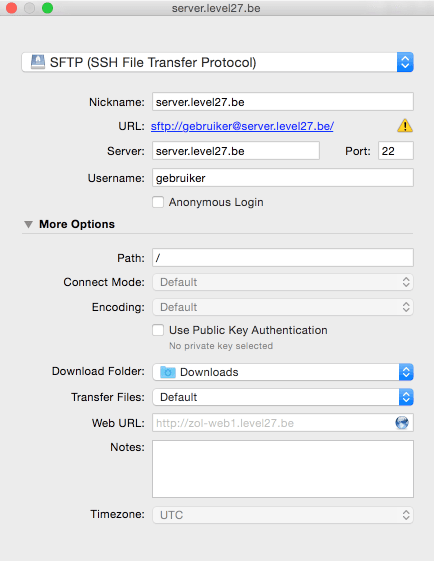
The only thing you have to do to use this instead of FTP is tick it in the settings. Every modern FTP client offers this option.


image331

If you ‘just’ want to FTP, you now have enough information and may stop reading here.

Problem 2 - passwords

Another weak spot we can address are passwords. Think for a moment about what you can do with a password and how this actually works. On our server you have a folder in which you want to place files via SFTP. And preferably you alone, you don’t want others to be able to modify your site. So we only grant access to those files if you know a valid username/password combination.

Now we are going to get a bit more technical.

We store that username on our server. Years ago we also stored the password. Now we only store the password in encrypted form, because we have no business with what your password looks like. In case of a serious compromise of a server with us, no passwords can be stolen this way.

If you choose a password, e.g. ‘abc123’ our server will first convert it into a hash, for example ‘2c6c8ab6ba8b9c98a1939450eb4089ed’. The unique thing about a hash is that you can generate the hash from the password, but if you have the hash, you can never find the password. The hash of a certain password is always the same.

(Note for the nerds among you, yes I use md5 as an example here, in reality better algorithms are used. I do this deliberately, because if I gave a sha512 example, some would still remark that I’d better use bcrypt. Or if I took bcrypt, etc…. :))

Then take back the following fictitious dialogue for a moment (and assume this happens under SFTP):

1server> User ok. Now your password.
2client> Password abc123
3server> OK, I have converted password abc123 into hash 2c6c8ab6ba8b9c98a1939450eb4089ed. Then I saw that user ftp0223 has that hash and I have logged you in. Now give me a command.

So it is not the password itself that is compared with the user on the server, but the hash of that password. So our server has not stored your password anywhere. Nice, right, so where is the weak spot?

The weak spot is the user, you. Because you always tick that your FTP program should store your password. And to be able to do the dialogue with the server above, your FTP program must store the password in readable text.

It still happens that we see hackers collecting passwords this way and hacking sites on our servers. They do this via malware, spyware, viruses, …

You never store those passwords? Good for you, but even then you can have problems. Maybe you have an email somewhere with those passwords you got from your hosting provider. Or you shared those passwords with someone, e.g. a programmer working on your site. Or within your company everyone knew the FTP password, but people left your company who can still access your site. All in all, enough reason to look for a solution for the use of passwords.

Solution 2 - away with passwords

Wouldn’t it be nice if you could identify yourself to our server in an unambiguous way, without needing a password?

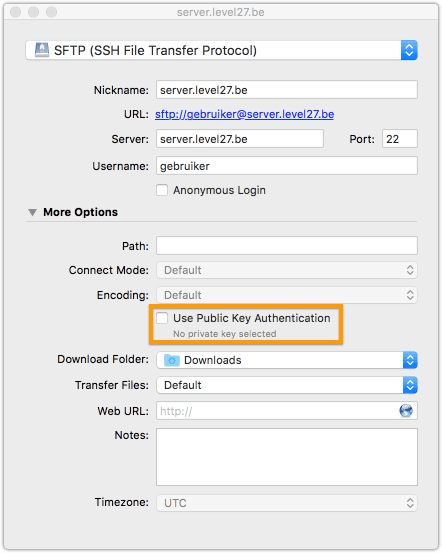
Well, that is possible with SSH. We use private and public key authentication for this. This is an advanced, yet still user friendly concept, where you work with keys on your PC.

Such a key is generated completely randomly, and always comes in pairs. A private key:

1-----BEGIN RSA PRIVATE KEY-----
2MIIEpAIBAAKCAQEAt69fPtRMmYDk0HCWRalQnGTGbUbqSg8j4XiMLmqVF9dxjjLN
3Dkhfq68DO4RCWJ5JEC8qv+dKjyy3Y5RP7FjUBb6D+Wi0KK/PDg1NYww9Cq5K8LKm
40xVGsnfJQ1hXOmvh/F6R1KPkiBLAH65f2Ph2a8Vn0ePfQwQRfc3YPhdyXjB33U8P
59elCKLz/+45jnvI2fObkLCDEISrwBcbSPaIKgFQOo+zjmF2KPQGJk17CNl/f6rYg
6MjhbFIZ30hhcvj11cXfaKJBwAKvV+uWsmQugCNd+FjdPJA8nQ98BZHwrY1RczG3H
7....
8i3rP9qUCgYBEBBKcABHoG4k5Z5RRQxpGM3ngBebHy+dn9owJYSWAySPvbL2GLTLv
9JXHO8fibBsrNo/fGOqzMIv2bz+CANQ0sJYcUgQEnRtRo0gLsaHw4/c8xtIC2ThMI
10LzhK/qChNVzQ/ME5eFPBy+q2i3Swni4KHKySWYPayrmuQvPY6PoVgQ==
11-----END RSA PRIVATE KEY-----

and a public key:

1ssh-rsa AAAAB3NzaC1yc2EAAAADAQABAAABAQC3r18+1EyZgOTQcJZFqVCcZMZtRupKDyPheIwuapUX13GOMs0OSF+rrwM7hEJYnkkQLyq/50qPLLdjlE/sWNQFvoP5aLQor88ODU1jDD0KrkrwsqbTFUayd8lDWFc6a+H8XpHUo+SIEsAfrl/Y+HZrxWfR499DBBF9zdg+F3JeMHfdTw/16UIovP/7jmOe8jZ85uQsIMQhKvAFxtI9ogqAVA6j7OOYXYo9AYmTXsI2X9/qtiAyOFsUhnfSGFy+PXVxd9ookHAAq9X65ayZC6AI134WN08kDydD3wFkfCtjVFzMbcdZimCSETEKNfmSnzyTxyEWvoDt+47ZFUiA9tbF peter@Peters-MacBook.local

Private and public keys are inseparably linked and useless without each other. How does this work?

The private key should never leave your computer or secure environment. You must never share it with anyone. Never! When you connect to our server, your private key is used to create an encrypted stream of data. The server has your public key and can decrypt that stream.

The key point here is that nobody can encrypt data in such a way that it can be decrypted with your public key. So if the data stream can be decrypted with your public key, the server is 100% certain that it’s really you.

Of course, this concept stands or falls with the secrecy of your private key. You could say that if your computer is infected with a virus, your private key is also at risk. In this case, it’s best to protect your private key with an extra password (passphrase). Another password, you might say? Yes, but one that you keep only in your head and NEVER store anywhere.

An additional advantage of this approach is that everyone has their own key pair. This means you also have a very clear view of exactly who has access to your server, more on this later.

In the next sections, we’ll explain how to do this in practice.

On the Mac client


1Peters-MacBook:~ peter$ ssh-keygen
2Generating public/private rsa key pair.
3Enter file in which to save the key (/Users/peter/.ssh/id_rsa):
4Enter passphrase (empty for no passphrase):
5Enter same passphrase again:
6Your identification has been saved in .ssh/id_rsa.
7Your public key has been saved in .ssh/id_rsa.pub.
8The key fingerprint is:
9fb:aa:3b:72:49:39:0b:95:d3:80:df:ae:61:72:a7:d9 peter@Peters-MacBook.local
10The key's randomart image is:
11+--[ RSA 2048]----+
12|     .           |
13|    . .          |
14|     . =         |
15|      = o        |
16|     . +S        |
17|    o B o.       |
18|     * @.        |
19|    . O E.       |
20|     oo+...      |
21+-----------------+

Now you can retrieve your public key:


1Peters-MacBook:~ peter$ cat .ssh/id_rsa.pub
2ssh-rsa AAAAB3NzaC1yc2EAAAADAQABAAABAQC3r18+1EyZgOTQcJZFqVCcZMZtRupKDyPheIwuapUX13GOMs0OSF+rrwM7hEJYnkkQLyq/50qPLLdjlE/sWNQFvoP5aLQor88ODU1jDD0KrkrwsqbTFUayd8lDWFc6a+H8XpHUo+SIEsAfrl/Y+HZrxWfR499DBBF9zdg+F3JeMHfdTw/16UIovP/7jmOe8jZ85uQsIMQhKvAFxtI9ogqAVA6j7OOYXYo9AYmTXsI2X9/qtiAyOFsUhnfSGFy+PXVxd9ookHAAq9X65ayZC6AI134WN08kDydD3wFkfCtjVFzMbcdZimCSETEKNfmSnzyTxyEWvoDt+47ZFUiA9tbF peter@Peters-MacBook.local
image332

On the Windows client

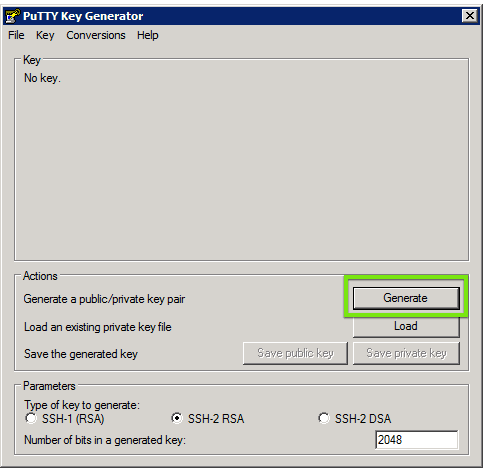
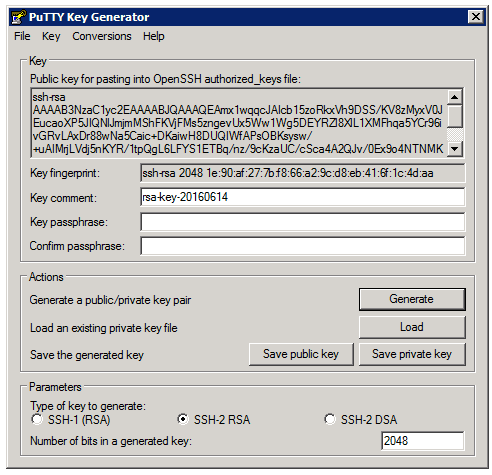
On Windows, SSH is not yet built in, although that may change in the future. In the meantime, you can use something like PuTTYgen. When you open PuTTYgen, click on Generate to create a key:

image333

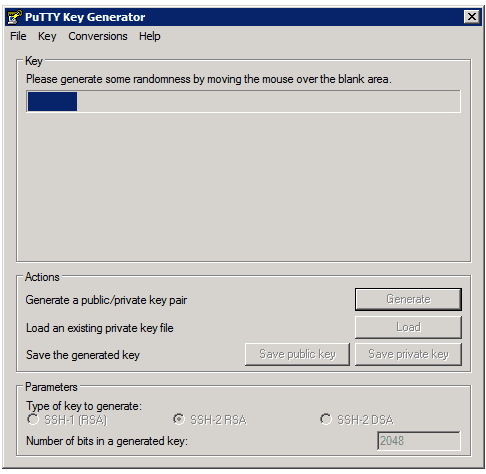
After that, you need to move your mouse around a bit to make the key truly random:


image334

And finally, you get your public and private key:


image335

On the server

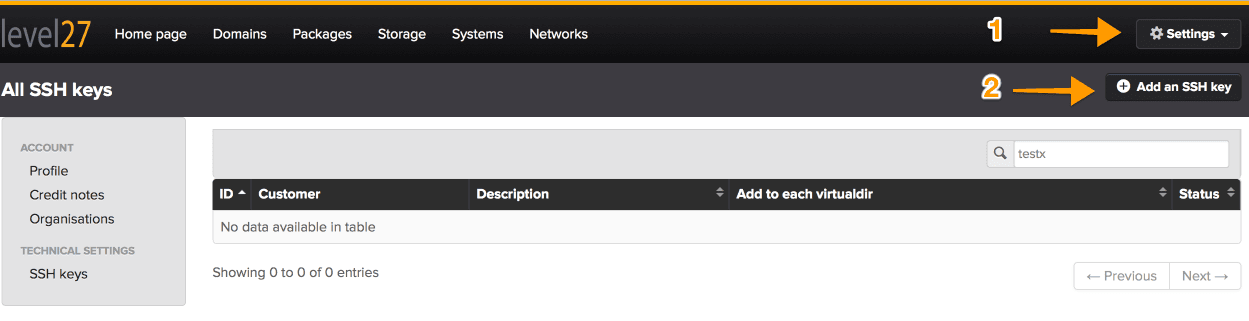
First, you need to add your public key to the control panel. This only needs to be done once, since you’ll use your public key for all your projects, much more convenient that way.


image336

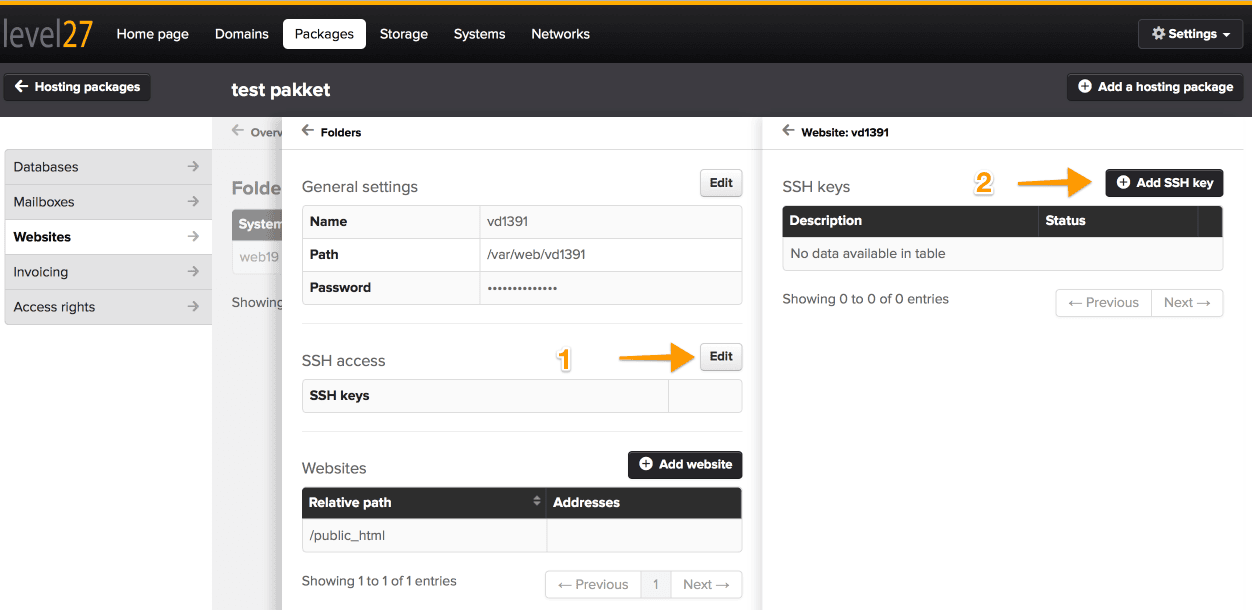
After that, you simply specify on the website who is allowed to have acces:


image337

Here you can clearly see who has access to a folder or a server. If someone leaves your organization, all you need to do is remove their public key from the server.

Read more?

  • https://filecamp.com/blog/top-5-reasons-ftp-dead/
  • https://ksantema.wordpress.com/2010/12/07/ftp-is-dead-now-will-someone-tell-developers/

Conclusion

To sum it up: FTP is dead, and you should replace it with SFTP. Passwords have weaknesses, so if my explanation made any sense, you’ll move on to public key authentication. There’s even a next step: two-factor authentication. But let’s save that for another article :)

Stay informed

Subscribe to our newsletter and receive the latest updates on our products and services.

By subscribing, you agree to our privacy policy