
logo level
SME
Agency
Large enterprise
contactOperationalControl Panel
newshow-varnish-makes-your-site-faster

How varnish makes your site faster

Varnish speeds up Web sites by storing pages in its memory and serving them immediately on the next request, significantly reducing load times. Proper implementation requires cooperation between programmers and server administrators, where cache settings must be fine-tuned to avoid errors and excessive caching.

Agency‎‎ㅤ22/12/2015
 How varnish makes your site faster image

What is caching?

Simply put, a cache is a storage location. On websites, caching is used to avoid repeating time-consuming tasks. The first time a task (e.g., building a menu) is requested, the result is stored in the cache. The next time, the task is not executed again; instead, the cached result is served directly to the visitor.

How and what can we cache?

At several levels:

  • query cache
  • key/value cache
  • reverse proxy

Query cache (database)

All databases have built-in query caching. This allows frequently executed SQL query results to be served directly from memory. It’s important to regularly tune your database server to make the most of this, and it also helps to write your queries in a way that maximizes cache efficiency.

However, query caching is not a magic solution: the database server can struggle to determine which queries are suitable candidates for caching and how long their results should remain in the cache.

Key/value cache (PHP)

We can also avoid repeatedly querying the database. Using a key/value cache such as Memcache or Redis, the developer decides which objects to cache and for how long.

For example, a website with a large navigation structure is usually stored in a tree structure in the database, which requires multiple SQL queries to retrieve completely. Even if query caching helps, multiple database requests are still needed.

With key/value caching, the results of these SQL queries can be stored in the server's RAM for hours, or until the site structure changes.

Full page caching

This type of caching goes even further. Instead of storing just parts of a site, the full HTML code is cached in memory. After all, the same page is often served to hundreds or thousands of users.

There are several ways to implement full page caching. In Drupal, this functionality is built-in. WordPress offers plugins to handle this for you.

An even better approach is to serve visitors before they reach your web server, using a reverse proxy, Varnish being the most well-known. This article explains what Varnish is, why it matters for you, and what to watch out for.

How does Varnish work?

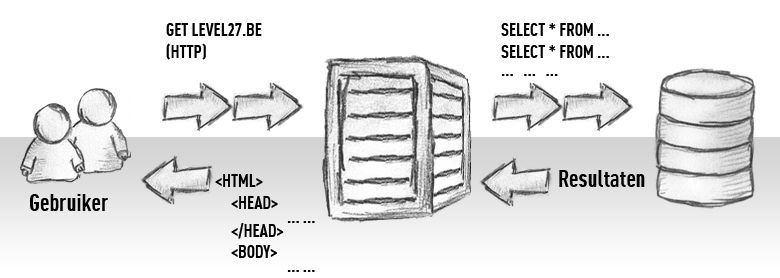
Here’s an illustration of how a standard website works today.

stap1-zonder-varnish.jpg
image352

So the visitor sends a request over the internet to the web server. On the web server, your website is executed, which usually involves accessing a database.

The time that elapses between the user’s request and the full page being displayed typically ranges from 100 ms to 2 s, assuming the site is well-optimized and the server isn’t overloaded. On average, it’s about 250–500 ms.

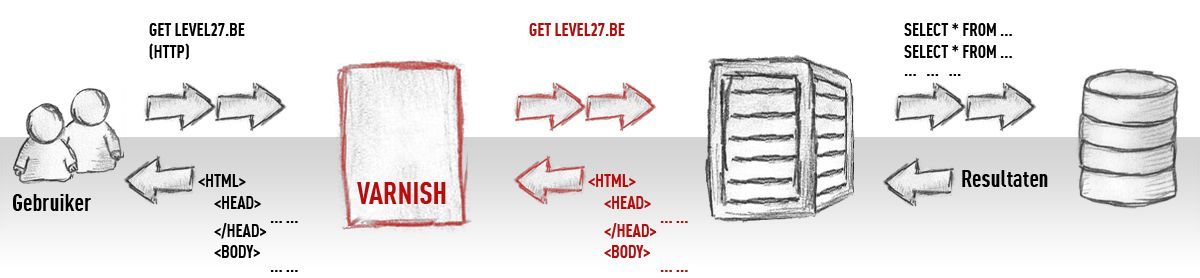
Now with Varnish: we place Varnish between the user and the website.


image353

What do you think now? How can an extra step actually be faster, since the request path is longer and seemingly slower?

No, that’s the beauty of it. When a request reaches Varnish, it first checks if the requested page is already stored in its memory. This is extremely fast: pages served from Varnish’s cache reach the visitor in less than 50 ms!

Great. So with Varnish, my site is super fast?

Yes and no. It’s not that simple, implementing Varnish requires effort from both the programmer and the server administrator.

Let’s discuss some of the pitfalls you might encounter and how to solve them.

Before we start, we need to clarify a few terms:

  • A HIT occurs when Varnish can serve a page directly from its memory. A MISS occurs when Varnish has to request the page from the web server.
  • The HIT ratio is the percentage of pages Varnish can serve from memory.

Nothing is cached

In the default configuration, Varnish is conservative. This ensures the site functions correctly, even if it comes at the expense of the HIT ratio.

This isn’t a problem; we just need to fine-tune a few things. Possible reasons why pages aren’t cached:

  • cookies, for example with a username or tracking cookie
  • variables in the URL (e.g., long query strings)
  • unnecessary session IDs

In most cases, some configuration changes are needed to overcome this. These adjustments must, of course, be made carefully.

Pages are cached for too long

Once Varnish is serving pages from memory, the next question is how long to keep them cached.

We can tell Varnish to keep pages for 1 hour. After that hour, it will fetch the page from the web server again to check if a new version exists.

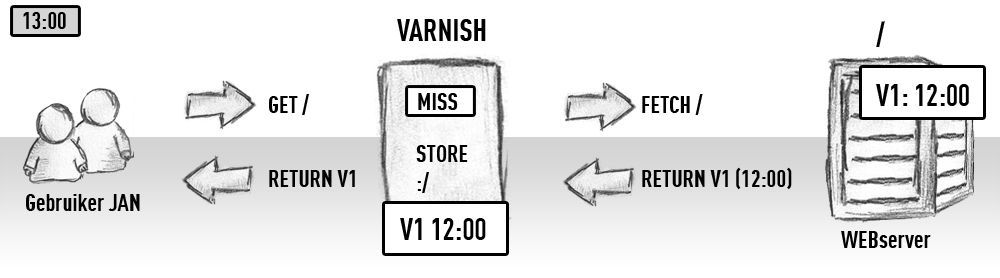
For example. At 1:00 PM, Jan visits our website. The page isn’t in Varnish’s memory, so it is fetched from the web server. This is called a Fetch. The page is delivered to the user and stored in Varnish’s memory:

image354

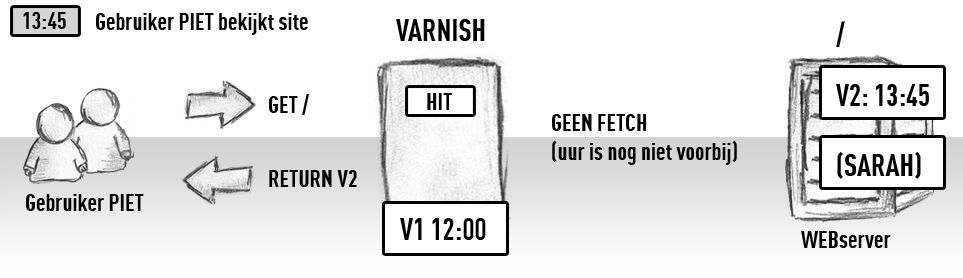
Now suppose that webmaster Sarah changes the page at 13:30, so in the web server there is a new version of the page (v2), but Varnish knows nothing yet. What happens then if another visitor Piet visits the website:

image355

That's not so great, Piet gets to see the version that Varnish fetched for Jan at 13:00, and not Sarah’s super cool customised version 2.

Now Piet can wait until 14:00, or Sarah can ask her programmer to install the PURGE module :)

All modern CMSs have purge modules where the website, when content is changed, will tell Varnish to remove that specific page from its memory immediately.

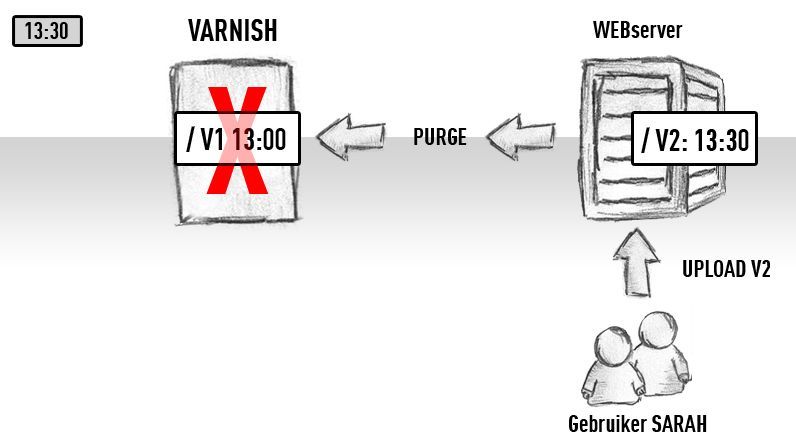
So at the moment that Sarah makes her adjustment, the website will send a Purge request to Varnish, which removes the outdated version from its memory:


image356

If Piet then comes to the site at 13:45, he will see version 2.

Agreed, it is not easy to implement this. And we very often see that this step is simply skipped. This is not a disaster, few sites are updated so often that the default setting of keeping it for 1h is not quite ok.

It is something you have to decide for yourself. We are already prepared to take that extra step together with you towards a perfect configuration.

Too much is being cached / my website no longer works

Sometimes we are too enthusiastic and cache too much. Then you get situations where different visitors see each other’s page, or wrong information is shown.

That is why it is important to have good cooperation between programmer and system administrator when setting up Varnish. That way we know together perfectly which cookies and settings may be cached and which may not.

I have a webshop

With webshops or dynamic sites there are usually personalised blocks. See for example:

image357

Top right space is provided for your name if you are logged in and how many items are in your basket.

This page must not be put entirely into Varnish, because then everyone would see at the top that his name is ‘Peter’ and that he just threw 1 iPhone into his basket.

So webshops are a bit more complex. We can decide not to cache these pages. But then that means all the pages, because that personalised info is in the header… So nothing can be put into Varnish, then we gain nothing from it?

Yes we can, there are some options we can apply!

Usually we make use of ESI (Edge Side Includes). In this case we will create the full page, but without the block that has to be personalised. That page can be cached by Varnish without problems. The separate block is then fetched directly by Varnish from the web server, for each user individually.

An alternative is to do Ajax calls for this block, so the full page can still be served by Varnish (as HIT).

Conclusion

We could write books full of books about Varnish, we are aware of that. And implementing Varnish is certainly not easy as the press of a button. But the rewards are great - so if your website is slow, or you want to handle more visitors, or whatever: don't hesitate to take the plunge into Varnish.

Stay informed

Subscribe to our newsletter and receive the latest updates on our products and services.

By subscribing, you agree to our privacy policy